
Inventory Database Schema
Table of Contents
|
Diagram of Database
Tables and Relationships |
4 |
|
5 |
|
|
5 |
|
|
6 |
|
|
8 |
|
|
9 |
|
|
11 |
|
|
12 |
|
|
13 |
|
|
14 |
|
|
15 |
|
|
16 |
|
|
17 |
|
|
18 |
|
|
20 |
|
|
|
|
|
21 |
|
|
21 |
|
|
21 |
|
|
21 |
|
|
21 |
|
|
21 |
|
|
22 |
|
|
22 |
|
|
22 |
|
|
22 |
|
|
23 |
|
|
23 |
|
|
23 |
|
|
23 |
|
|
24 |
|
|
24 |
|
|
24 |
|
|
24 |
|
|
24 |
|
|
24 |
|
|
25 |
|
|
25 |
|
|
25 |
|
|
25 |
|
|
26 |
|
|
26 |
|
|
|
|
|
27 |
|
|
27 |
|
|
27 |
|
|
27 |
|
|
28 |
|
|
31 |
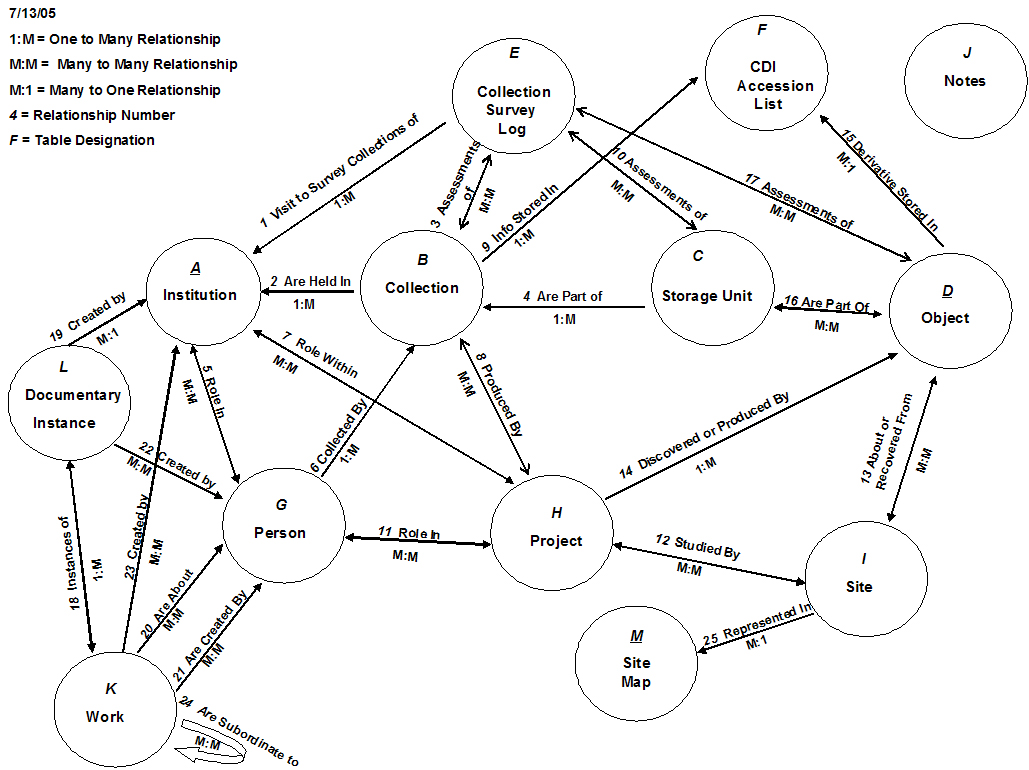
TABLES AND TABLE FIELDS
A: Institution TableDescription: The Institution Table will provide information on all institutions and institutional offices included in the database. Sometimes these institutions will appear in the data as repositories, other times they will appear as institutions that provided the major financial backing and/or staff to complete a project. This table will provide basic information on the institutions such as their address and relevant contact people. Related to: · (2) Collection Table: 1:many · (7) Project Table: many:many · (5) Person Table: many:many · (1) Collection Survey Log Table: 1:many Fields: · Full Name: Data Type = text. The institution’s full name. · Abbrev: Data Type = text. Abbreviation for each institution. · Office: Data Type = text. Name of the office within the institution serving as a contact for CDI. · Street 1: Data Type = text. Street address of institution. · Street 2: Data Type = text. Street address of institution. · City: Data Type = text. City where institution is located. · State: Data Type = text. State where institution is located. · Zipcode: Data Type = text. Zip code of institution. · Contact Person: Data Type = text. The main contact person at the institution that CDI should contact in order to schedule visits, see materials etc. · Office Hours: Data Type = text. Hours when the contact person/persons is/are available. · Phone: Data Type = text. Phone number of contact person or persons. · Fax: Data Type = text. Fax number of contact person(s) or office. · Email: Data Type = text. Email address of contact person(s) or office. ·
URL: Data Type = text. URL of institution or office. Description: The Collection table will contain all the basic information on the materials to be analyzed/recorded at each repository institution. Collections will be defined as one grouping of material within one office or division of one institution (repository). For example, the Papers of Neil Judd in the National Anthropological Archives will constitute one collection. Hopefully, most collections will have finding aids created by the repository institution. Whether or not this is the case, and if so, where and in what format CDI has obtained the finding aid will also be included in the database. The collections table Related to: · (2) Institution Table: many:1 · (4) Storage Unit Table: 1:many · (6) Person Table: many:1 · (8) Project Table: many:many · (3) Collection Survey Log Table: many:many ·
(9) CDI
Accession Table: 1:many Fields: · Title: Data Type = text. Reference name for the particular collection assigned by CDI. In cases where a finding guide is available, the name offered by the repository institution will be used to promote standardization. · Short Title: Data Type = text. A shortened version of the title. · Number: Data Type = text. A unique identifier assigned to each collection by CDI. · Finding Aid Available: Data Type = Yes/No. A yes or no field indicating whether or not a finding aid for this particular material set is available. · Finding Aid Notes: Data Type = text. Text field with notes on finding aid. · Other Data Source: Data Type = text. Any other information produced by the repository institution that offers information/organization about the collection. · Types of Material: Data Type = text. Text field indicating what types of material are in the collection. See Data Objects list for all the different types of material that could be entered into this field. · Extent of Material: Data Type = text. Indicates how much material is in the collection. In some cases this may be very general information and in others it may be quite specific. · Recorders Comments: Data Type = text. Offers room for more comments, if necessary. · CDI Analyst Recorder: Data Type = text. Indicates which CDI staff member recorded the information comprising the record. · Date Entered: Data Type = Date/Time. Indicates date on which the record was included in the database.
Description: The information contained in the Storage Units Table will pertain to the individual boxes, containers, sets or lots etc. that the repository institution has arranged and stored the collection in. For instance, the papers of Neil Judd are contained within boxes that are listed in a finding aid. In this case, each box is a storage unit and will be assigned a unique identifier called the CDI Storage Unit Designation. Storage units comprise collections, which are located within institutions. Related to: · (4) Collection Table: many:1 · (16) Object Table: many:many · (10) Collection Survey Log Table: many:many Fields: · Institutions Catalog No: Data Type = text. The number or identifier, if any, provided for this particular lot by the repository institution. · Institutions Catalog Descriptions: Data Type = text. Any textual description pertaining to the lot provided by the repository institution. · CDI Storage Unit Designator: Data Type = text. A unique identifier given by CDI to each storage unit examined. This field will provide a relationship to the Collection Survey Log Table and the Objects Table. · CDI Description of Materials: Data Type = text. General textual description of the materials in a storage unit. · Other Description): Data Type = text. Description of any other important information pertaining to the storage unit. · Actions Needed: Data Type = text. Describes any immediate actions needed for this lot. For instance, items judged to be of particular importance to CDI staff and/or in need of immediate preservation could be flagged for special attention such as immediate scanning, photography etc. · Action Date: Data Type = Date/Time. Date of any action taken on this storage unit. D:
Object Table
Description: The objects table will contain the most specific information on materials viewed by the CDI staff for the inventory process. Much more specific information on each individual object of interest will be obtained in later phases of the project. An object is one particular item contained within a storage unit, which is contained within a collection which is held by a repository institution. An object could be an excavation report, a photo, a piece of pottery etc. Related to: · (16) Storage Unit Table: many:many · (14) Project Table: many:1 · (13) Site Table: many:many · (15) CDI Accession List Table: 1:many Fields: · Institutions Object Designation: Data Type = text. Any unique identifier given by the repository institution to the object. · CDI Object No.: Data Type = text. Unique identifier given by CDI to each object viewed. · CDI Object Type: Data Type = text. Object type designation provided by CDI. See controlled vocabulary list for all object types and their descriptions. · CDI Description: Data Type = text. A textual description of the particular object being examined provided by CDI. · Comments: Data Type = text. Offers room for more comments, if necessary. · Published: Data Type = Yes/No. Indicates whether or not the object has been illustrated or described in a publication. · Publication Description: Data Type = text. If the “Published” field indicates “yes” then this field will provide any textual details available on the publication—what it is, where it’s located etc. · Scanned: Data Type = Yes/No. Indicates whether or not the object has been scanned. · Scan Description Notes: Data Type = text. If the “Scanned” field indicates “yes” then this field will provide any textual details regarding the scan. Who scanned it? Where is the scan? Do we have it? What is the file name/number? · Photographed: Data Type = Yes/No. Indicates whether or not the object has been photographed. · Photo Description Notes: Data Type = text. If the “Photographed” field indicates “yes” then this field will provide any textual details regarding the photograph. Where is it? Is it included with an excavation report or separate etc.? · Copyright: Data Type = Yes/No. Indicates whether or not the object is protected by copyright. · Copyright Information: Data Type = text. Includes any details regarding the copyright. Who holds the copyright? · Extent: Data Type = text. “Amount” of the object. For documents, extent is generally thought of as how long the document is, or how many pages. For a collection of photos, we would want to know how many photos are included in the object. · Actions Needed: Data Type = text. This field allows CDI to flag any very important objects that might require immediate attention for various reasons including preservation concerns. · Copy Requested: Data Type = Yes/No. Indicates if CDI has requested a copy of the item from the repository institution. · Copy Requested Date: Data Type = text. Notes the date when CDI requested a copy of the item. ·
High Priority: Data Type = text. Indicates whether or not an object is
considered to be of high priority by ·
Indicated By: Data Type = text. Name of the · Priority Notes: Data Type = text. Notes on the ranking of the object. This could inlcude comments made and questions asked by steering committee members.
E:
Collection Survey Log Table Description: This table will provide information regarding activities conducted on every visit to every institution by every CDI staff member. A visit is defined as one trip (regardless of how long) to one institution by one CDI staff member for the purpose of recording information in one collection. In other words, if two CDI staff members are working on the same materials, this work will be recorded in two separate log entries (one for each person), each with their own visitation number. The log is intended to track what collections and storage units have been assessed and what should be done on the next visit to a particular institution, collection or storage unit.
Related to: ·
(1)
Institution Table: many:1 · (3) Collection Table: many:many ·
(10)
Storage Unit Table: many:many Fields: · Visitation Number: Data Type = text. A unique identifier provided by CDI to designate a particular visit by a particular CDI staff member to a particular institution. This field will provide a relationship with the Storage Units Table. · CDI Staff Member: Data Type = text. Name of the CDI staff member who conducted the visit. · Worked With: Data Type = text. A general textual description of what materials were examined on the visit. · Begin Date of Visit: Data Type = Date/Time. Date on which visit began—defined as the first day of the visit upon which materials were viewed/recorded at the repository institution. · End Date of Visit: Data Type = Date/Time. Date visit ended—defined as the last day of the visit upon which materials were viewed/recorded at the repository institution. · Description of Work: Data Type = text. Describes the work accomplished by the CDI staff on this particular visit. This description should be general—keeping in mind that the specific information will be recorded in the data objects and Storage Units tables. · Contact Next Visit: Data Type = text. This field should contain any information that may differ from the information provided in the contact field of the institution table. At times there may be contacts other than those included in the office field that are useful to CDI. The role of this contact should also be outlined within the text field along with any relevant information such as advance notice prior to visit. Description: The CDI Data Inventory Table will provide information on any derivative files or object that CDI has acquired including what format they are in and where they came from and where they can be found. Related to: ·
(15)
Object Table: many:1
·
(9) Collection Table: many:1 Fields: ·
CDI File Catalog Number: Data
Type = text. A unique
identifier provided to each object by CDI.
This field will provide a relationship with the Objects Table. ·
Type: Data Type = text. Format of the accession. Refer to the controlled vocabulary for a
complete list of accession types and their descriptions. ·
Physical File Location: Data
Type = text. Provides the location of any
physical files regarding the data object.
·
Electronic File UVa: Data Type = hyperlink. A path to any electronic file
regarding the data object housed at UVa.
For instance this could be a .tif file of a scan. ·
Description of Data: Data
Type = text. Describes the data
that CDI has obtained pertaining to the object, collection etc. ·
Source of Data: Data Type = text. Provides the
source of the data/metadata—this could be a person or an alternate data
source. ·
Receiver of Data: Data
Type = text. The individual who
received the information for CDI (e.g., in cases where scholars send us
material). ·
Date Received: Data
Type = Date/Time. Provides the
date that CDI received the information. ·
Entered By: Data
Type = text. Name of the CDI
staff member who entered this information into the database. ·
Comments: Data
Type = text. Any other relevant
comments regarding the data. ·
Checked Out: Data
Type = Yes/No. Indicates whether the
material is currently checked out of the ·
Person Checked Out:
Data Type = text. Text field
indicating Description: This table will contain information regarding all individual scholars referred to in the database. This will allow us to easily query the database for all the materials/collections relating to one individual and also to track the role of scholars within particular projects and institutions. Related to: · (5) Institution Table: many:many · (6) Collection Table: 1:many · (11) Project Table: many:many · (20) Work Table: many:many · (21) Work Table: many:many · (22) Documentary Instance Table: many:many Fields: · Name: Data Type = text. Full name of scholar.
Description: The Project Table will allow us to start compiling information on
particular projects and all the materials derived from or discovered by any
particular project. Related to: ·
(12) Site Table: many:many
·
(14) Object Table: 1:many ·
(11) Person Table: many:many ·
(7) Institution Table: many:many ·
(8) Collection Table: many:many Fields: · Title: Data Type = text. Unique identifier for each project included in the archive. Provides a relationship to the Collections Table. · Short Title: Data Type = text. A shortened version of the title. · Description: Data Type = text. Textual description of the project. · Begin Fieldwork: Data Type = Date/Time. Date that any fieldwork began. · End Fieldwork: Data Type = Date/Time. Date or year that fieldwork ended.
Description: The Site Table will allow CDI to start compiling information about
particular objects based upon what site they come from or pertain to and link
those objects with other information about the site such as who worked there. Related to: ·
(13) Object Table: many:many
·
(12) Project Table: many:many ·
(25 ) Site Map Table: 1:many Fields: · Popular Name: Data Type = text. This field will provide a common name used to refer to each site such as “Una Vida.” · CDI Site Name: Data Type = text. Unique Identifier provided by CDI for every site mentioned in the database. · State Official: Data Type = text. Official state designation used to identify site. · Bc Site Number: Data Type = text. Number for any site designated by the BC numbering system. · Smithsonian: Data Type = text. Designation for site according to the Smithsonian site numbering system (e.g. 29SJ634). · NPS Site Number: Data Type = text. Site number according to the NPS site numbering system. · Comments: Data Type = text. Comments field used to not any discrepancies between site numbers or other useful information regarding the site. Description: The notes table is a space dedicated to long textual notes above and beyond the space allowed for instance in the CDI object description field of the objects table. At any place in the database, CDI staff may make reference to a note by number which will point to the textual information provided in this table. Related to: No Relationships Fields: ·
Number: Data Type = text. Auto generated number referring to a
particular note. · Contents: Data Type = text. Large text field devoted to information not recorded elsewhere in the database.
Description: The Work Table contain all of the information relevant to describing an intellectual object or work, which may be embodied in one or more instance. Related to: ·
(24)
Work Table: 1:many ·
(21)
Person Table: many:many ·
(20)
Person Table: many:many ·
(23)
Institutions Table: many:many ·
(18)
Documentary Instance Table: 1:many Fields:
Description: This table will contain information on particular physical or concrete embodiment of a work. A documentary instance can instantiate only one work, though it may contain components that are works or sub-works. Related to: ·
(18)
Work Table: many:1 ·
(22)
Person Table: many:many ·
(19)
Institution Table: many:1 Fields: ·
Preferred
Title: Data Type = text. Preferred title of work. ·
Alternative
Titles: Data Type = text. Alternative title of work. A work may have many alternative titles;
therefore, alternative titles for works will be contained in a linked
table. ·
Statement
of Responsibility: Data Type =
text. Generally a transcription of information
provided for on the title page indicating who is responsible for this
documentary instance (e.g. author, illustrator). ·
Edition
Statement: Data Type = text. Statement distinguishing this instance from
another instance of the same work typically in content or form. ·
Place of
Publication: Data Type = text.
Where the instance was published. ·
Publisher: Data Type = text. Name of the publisher ·
Publication
Year: Data Type = text. Date or
approximate date of the publication or creation of the work. When the precise publication or creation
date of the particular work in question is unknown, the date of the earliest
instance of publication should be used.
·
Publication
Year Circa: Data Type =
Yes/No. If the creation date is
uncertain, the value should be Yes, otherwise No. ·
Series
Statement: Data Type = text. Title of series or collection within which
the instance is published. ·
Physical
Description Form: Data Type =
text. Physical form of the documentary
instance, e.g. paper, book, digital/xml, digital/jpeg. ·
Physical
Description Extent: Data Type =
text. Number of pages or file size. ·
Identifier: Data Type = text. Unique identifier such as ISBN or
ISSN. ·
Location: Data Type = text. Name of the repository or institution where
the documentary instance is located and the call number or location of the
documentary instance within the institution.
In the case that the documentary instance is a CDA accession, the accession
number should be provided. ·
CDI Location: Location of the Documentary Instance
if accessioned by CDI. ·
Descriptive
Note: Linked table used for any descriptive
data considered important, but not otherwise accommodated in the record; or
for observations about the instance that provide grounds for other
descriptive data. Note may be used to
specify the source from which the cataloging is derived, such as a Library of
Congress bibliographic record.
Description: This table contains digitized maps and illustrations of sites entered into the database. Related to: ·
(25)
Site Table: many:1 Fields: ·
Name: Data Type = text. Name of Map. ·
URL: Data Type = url. Specifies the location of the image so that
it can be displayed.
1: Collection Survey Log and
Institution This is a one to many relationship. One institution may be visited many times for the purpose of surveying collections and therefore, may be entered into the Collection Survey Log multiple times. Each visit of each person will be to one institution. This is a many to one relationship. One collection is held in one institution. One institution may contain many collections. 3:
Collection and Collection Survey Log This is a many to many relationship. One collection may be assessed over the course of several visits and therefore will appear in the Collection Survey Log multiple times. One collection survey (visit) may account for the assessment of several collections at the same institution. 4:
Storage Unit and Collection This is a many to one relationship. One storage unit may be part of only one collection. One collection may have many storage units. This is a many to many relationship. One person may have many roles within one institution. One institution may be affiliated with many different people. We will be interested in tracking the role of a person within an institution and how that may have changed over time; therefore, a join table with role and years as the primary data objects has been created for these two tables.
This is a one to many relationship. One person can contribute to many collections. One collection is either collected or produced by one person (primary scholar). This is a many to many relationship. One institution may have many roles within a project and one project may be affiliated with many different institutions. For the purposes of this database, we will be interested in tracking the role of an institution within a particular project and how that may have changed over time; therefore, a join table with the following data objects will be created for these two tables:
This is a many to many relationship. One collection may be produced by many projects. One project may contribute to many different collections. 9:
Collection and CDI Accession This is a one to many relationship. One collection may be referred to multiple times in the CDI Accession List. One item in the CDI Accession list will only refer to one collection. 10: Storage Unit and Collection Survey Log This is a many to many relationship. One storage unit may be visited many multiple times and therefore, will appear in the Collection Survey Log multiple times. One recorded visit in the Collection Survey Log may account for the assessment of multiple storage units. In the case that a detailed finding aid is acquired by CDI, information on individual storage units may be available before a visit is made. However, no visitation number will be associated with a storage unit until it assessed by a CDI staff member in person. This is a many to many relationship. One project may be associated with multiple people. One person may have a role within many different projects. For the purposes of this database we will be interested in tracking an individual’s role within a specific project and how that may have changed over time; therefore, a join table with the following data objects will be created for these two tables:
This is a many to many relationship. One site can be studied by many projects. One project can study many sites. This is a many to many relationship. One object (e.g. field notes from an archaeological survey) may be about or recovered from many sites. One site can produce many objects (e.g. pieces of pottery). This is a one to many relationship. One Object is discovered or produced by one project. One project can discover or produce many objects. 15:
Object and CDI Accession List This is a one to many relationship. Many items catalogued in the CDI Accession List may be the derivative of one object. One item in the CDI Accession list may refer to only one object. For example one piece of pottery may be scanned and photographed by CDI multiple times. Each scan and photo is a separate item in the CDI Accession List, each referring to a single object (the piece of pottery). This is a many to many relationship. Since an object may be a document with parts contained in different (most likely adjacent) storage units, one object may be contained in several storage units. One storage unit may contain many objects. 17:
Object and Collection Survey Log This is a many to many relationship. One object may be assessed on many different visits documented in the Collection Survey Log. One visit documented in the Collection Survey Log may account for the assessment of many different objects. 18: Work and Documentary Instance This is a one to many relationship. One work may be instantiated by many
documentary instances. One documentary
instance can instantiate only one work. 19: Documentary Instance and Institution This is a many to one relationship. One documentary instance may be created or authored by (Note: not published by. Publisher is a field in the documentary instance table and not the subject of this relationship) one institution. One institution may create many documentary instances.
20: Work and Person A The works and person tables have two different relationships. The first is defined by the statement, works are about people. In other words, people are the topic of works. This is a many to many relationship. One work may be about many people and one person may be the topic of many works. The second relationship between works and people is defined by the statement, works are created by people. In other words people author works. This is a many to many relationship. One person may create many works and one work may be created by many people. However, a person (or persons) may have many roles in the creation of a work. Therefore, a join table with the following data objects is necessary:
22: Documentary Instance and Person This is a many to many relationship. One documentary instance can be created by many people and one person may create many documentary instances. For instance, a person who translates a work from one language to another has created a particular documentary instance of that work. In order to specify what role a person may have had in the creation of any particular documentary instance, a join table with the following data objects is necessary:
This is a many to many relationship. One work may be created by many institutions. One institution may create many works. Although cases of many institutions contributing to one work may be very rare, this relationship is certainly possible.
24: Work and Work This is a many to many relationship. One work may be subordinate to many works. For instance, Shakespeare’s Hamlet may be included in many anthologies, each of which is a work in its own right. This is a one to many relationship. One site may have many maps, but one map can be of only one site. FIELDS WITH CONTROLLED VOCABULARIES Role
of an institution in a project: Role will be defined by the following Yes/No Fields: ·
Did
the institution provide funding? ·
Did
the institution provide staff? ·
Did
the institution provide space? · Is the institution a repository for materials? Role
of a person within an institution:
Role
of a person within a project: Role will be defined by the
following Yes/No fields:
CDI_Object_Type: This field appears in the Objects Table.
|